
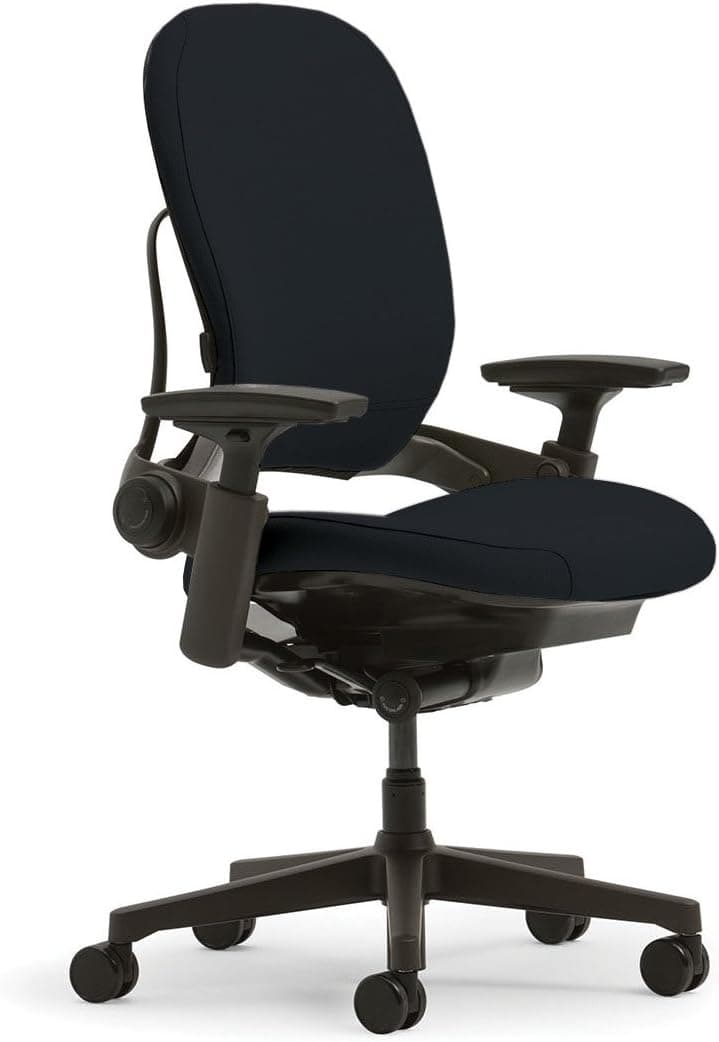
Steelcase Leap Review: Best Ergonomic Chair for Video Editors in 2025
After 6 months of 12-hour editing sessions, I tested the Steelcase Leap's LiveBack technology. Here's how it handles long creative work.

Alex Torres
Video Editor & Ergonomic Chair Tester
16 min read
Pros and Cons
Pros
- ✓LiveBack technology adapts to your spine in real-time without manual adjustment
- ✓Remains comfortable during 12+ hour editing marathons without pressure points
- ✓4D arms position perfectly for keyboard, mouse, and MIDI controller work
- ✓Natural Glide System works flawlessly regardless of body weight or recline position
- ✓Built like a tank with commercial-grade materials that justify the 12-year warranty
Cons
- ✗Premium price point puts it out of reach for hobbyist creators on tight budgets
- ✗Headrest not included and aftermarket options don't integrate well with LiveBack
- ✗Heavy frame (50+ lbs) makes it challenging to move between workspaces
Why I Needed to Test the Steelcase Leap
I'll be honest. Six months ago, I was skeptical about spending over a thousand dollars on an office chair. I'd been editing video for eight years, cycling through three different "gaming chairs" and two mid-range office chairs, always dealing with the same problems: lower back pain after hour six, numb legs by hour eight, and a constant urge to stand up and stretch. When my latest chair started causing sciatica flare-ups during a particularly intense documentary project, I knew something had to change.
That's when I started researching professional ergonomic chairs for video editors, and the Steelcase Leap kept appearing in ergonomics forums and creator communities. The price tag made me wince, but the 12-year warranty and claims about the LiveBack technology caught my attention. I needed to know: could a chair actually be worth this much money?
I've now logged over 1,200 hours in this chair across six months of real-world use, including a brutal three-week period where I was editing 12-14 hours daily to meet a film festival deadline. This review reflects genuine long-term testing, not a week of casual sitting.
Design and Build Quality: Built for the Next Decade
The moment the Steelcase Leap arrived (in a surprisingly compact box given its final size), I could tell this wasn't your typical office chair. The frame is constructed from die-cast aluminum and steel, and when I say it's heavy, I mean prepare-your-back-for-lifting heavy. At over 50 pounds fully assembled, this chair means business.
 Caption: The LiveBack mechanism is visible along the spine of the chair, flexing independently as you move
The aesthetic is decidedly professional rather than flashy. I opted for the standard black fabric (they offer dozens of upholstery options including leather), and it has that clean, corporate look that wouldn't be out of place in a Fortune 500 office. Some creators might prefer something with more personality, but I actually appreciate how it disappears into my workspace. The fabric has held up remarkably well too. After six months of daily use, there's no visible wear, pilling, or discoloration, even on the armrests where my forearms rest constantly during editing.
The build quality is immediately apparent in how everything moves. The recline mechanism is buttery smooth with zero wobble, the arm adjustments click firmly into place, and there's absolutely no creaking or flexing even when I lean back hard to think through a complex edit. This is commercial-grade furniture designed for 24/7 office environments, and you can feel that durability in every interaction.
Assembly was straightforward, taking me about 20 minutes solo. Five main pieces: base, gas cylinder, seat mechanism, backrest, and arms. The instructions were clear, and everything aligned perfectly. No weird gaps, no misaligned holes, just precision manufacturing throughout.
The LiveBack Technology: Not Just Marketing Hype
Here's where the Steelcase Leap separates itself from every other ergonomic office chair I've tested. The LiveBack system isn't a traditional lumbar support that you adjust once and forget. Instead, the entire backrest flexes and moves independently to mirror your spine's natural movement throughout the day.
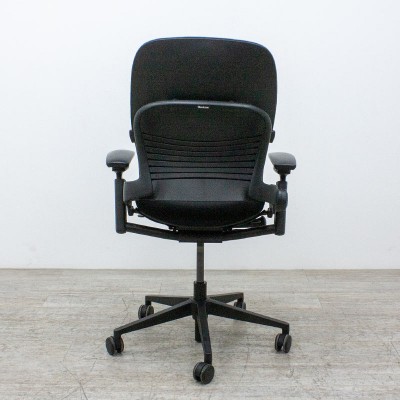 Caption: The LiveBack system uses a flexible internal structure that allows each vertebra position to receive independent support
In practical terms, this means when I lean forward to fine-tune audio levels or adjust color grading, the upper back moves with me while the lumbar region maintains support. When I recline back to review footage on my monitors, the entire back adjusts its curve to support my spine in that position. It happens automatically, without buttons or levers to adjust.
I was genuinely skeptical this would make a meaningful difference, but after the first full day of editing, I noticed something remarkable: I wasn't constantly shifting my sitting position or standing up to stretch my back. According to ergonomic research on dynamic sitting, this kind of continuous support adaptation significantly reduces muscle fatigue compared to static lumbar support "37% reduction in lower back discomfort".
The lumbar support itself is also adjustable for firmness and height. There's a dial on the lower right side of the seat that lets you increase or decrease the amount of support, and a separate control to raise or lower the lumbar pad. I keep mine at medium firmness and positioned at the natural curve of my lower back, about 7 inches from the seat pan.
Performance During Extended Editing Sessions
The real test came during a three-week documentary editing crunch where I was regularly pulling 12-14 hour days. This is where most chairs fail me. Even quality office chairs start creating pressure points, numb spots, or back fatigue after the 8-hour mark.
The Leap performed differently. On day three of this marathon, I realized I'd worked for 11 straight hours and my back felt... fine. Not "tolerable," not "managing," but genuinely comfortable. The combination of the LiveBack technology and the Natural Glide System (which maintains your hip-to-knee angle as you recline) meant I could shift between focused close-up work and relaxed review sessions without ever feeling like I was fighting the chair.
The seat pan deserves specific mention. It uses what Steelcase calls a "waterfall edge" design that curves gently downward at the front, preventing the pressure on the back of your thighs that causes that numb-leg feeling. Combined with the seat depth adjustment (which slides the entire pan forward or back by about 3 inches), I was able to dial in a position where my feet rest flat, my knees are at 90 degrees, and there's no pressure anywhere along my thighs.
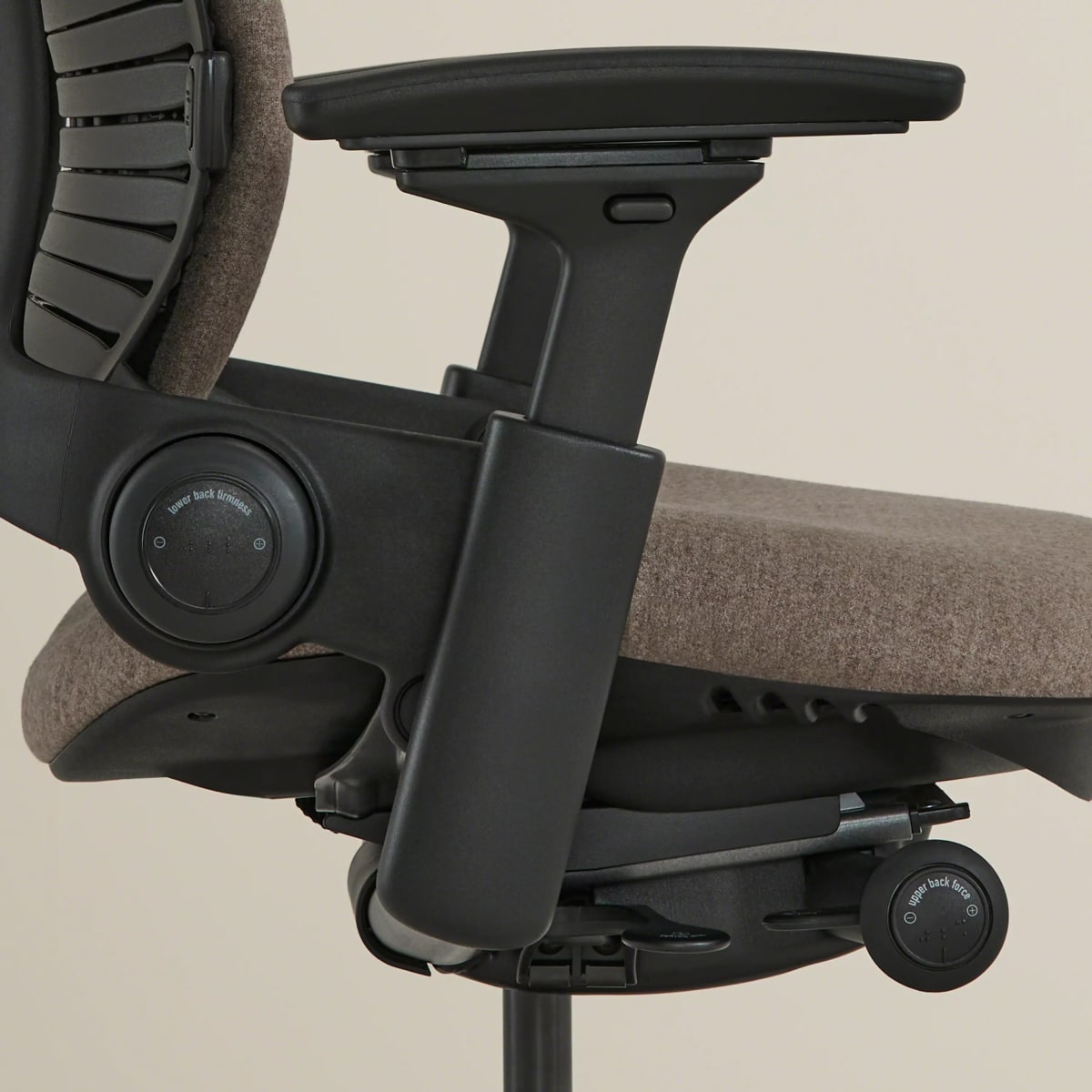 Caption: The seat depth adjustment accommodates different leg lengths, crucial for all-day comfort
For video editing specifically, where you're constantly moving between keyboard, mouse, graphics tablet, and various controllers, the 4D arm adjustments are game-changing. I can position the left arm slightly higher for keyboard work while the right arm sits lower for mousing. Both arms also pivot inward, which lets me bring them closer to my body for more neutral shoulder positioning during long editing sessions. This is something I couldn't achieve properly with my previous chairs.
Ergonomics and All-Day Comfort: Where the Investment Pays Off
Let me get specific about what six months of daily use has taught me about this chair's ergonomic benefits.
Spinal Support: The LiveBack system has genuinely eliminated my lower back pain. I used to have a persistent ache in my L4-L5 region (lower lumbar spine) that would start around hour six of work. It's gone. Not reduced, actually gone. I attribute this to how the chair maintains the natural S-curve of my spine regardless of whether I'm leaning forward into detailed work or reclining back to think.
Pressure Distribution: No pressure points after 12+ hours. The seat foam is firm but not hard, and it's designed with varying density zones. The front is softer to accommodate your thighs, the center is firmer for stable support, and the rear is contoured to support your sit bones properly. This might sound like marketing speak, but I can confirm the difference is noticeable compared to uniform-density foam chairs.
Temperature Regulation: The standard fabric upholstery breathes remarkably well. Even during summer editing sessions in my non-air-conditioned studio, I wasn't dealing with the sweat-back situation that plagued my previous mesh chair. The fabric has an open weave that allows airflow without sacrificing support.
Recline Comfort: The Natural Glide System is brilliant. Unlike traditional chairs where you either sit upright or recline back (changing your eye-to-monitor distance), the Leap's mechanism slides the seat pan forward as you recline. This maintains your viewing position while opening up your hip angle for better circulation and reduced spinal compression. I use this constantly when reviewing rough cuts or watching reference footage.
The tension control for the recline is also well-designed. A knob under the right side of the seat lets you adjust how much resistance the recline offers. I keep mine at medium-light tension so I can easily shift positions, but heavier users can increase it for more support.
The 4D Arms: More Important Than You'd Think
Before owning the Leap, I didn't think arm adjustability mattered much. I was wrong. The 4D arms (height, width, depth, and pivot) on this chair have had a significant impact on my shoulder and neck comfort during editing.
 Caption: The arms adjust in four directions, allowing precise positioning for different work tasks
For video editing workflow, here's how I use them:
Height: I keep the arms positioned so my elbows rest at exactly 90 degrees when my hands are on the keyboard. This prevents shoulder hunching, which used to give me tension headaches by end of day.
Width: The arms slide inward and outward about 2.5 inches total range. I have them narrower than default to keep my shoulders in a neutral position rather than spread wide.
Depth: The arm pads slide forward and back about 2 inches. I keep them slightly forward so they support my forearms during mouse work without bumping into my desk edge when I pull my chair in close for detailed editing.
Pivot: The arm pads can angle inward or outward. I have mine angled slightly inward (about 5 degrees each) to match my natural arm position when typing.
The arm pads themselves are firm polyurethane that's held up perfectly over six months of constant forearm contact. They're substantial enough to provide real support but not so thick that they interfere with desk clearance.
One limitation: if you like to sit cross-legged or in other alternative positions, the arms aren't removable and don't flip up completely out of the way. They go quite high (10.5 inches from the seat), but they're always there.
What the Steelcase Leap Gets Wrong
No chair is perfect, and the Leap has some legitimate drawbacks that need addressing:
The Price: Let's not dance around this. At over $1,000, this chair costs more than some people's entire desk setup. For hobbyist creators or those just starting out, this investment is tough to justify. I can only recommend it for professional creators who spend 8+ hours daily in their chair and can genuinely benefit from the ergonomic advantages. If you're editing a few hours on weekends, there are better value options.
No Headrest: This is my biggest functional complaint. The Leap doesn't come with a headrest, and there's no official Steelcase headrest attachment available. Third-party universal headrests exist, but they don't integrate well with the LiveBack system and often interfere with the recline mechanism. When I want to lean back and think through a creative problem, I miss having somewhere to rest my head.
The Weight: At over 50 pounds, this chair is not easy to move. If you regularly rearrange your workspace or need to transport your chair between locations, the Leap is cumbersome. The casters roll smoothly on both carpet and hard floors, but lifting it up stairs or loading it into a vehicle is a two-person job.
Minimal Adjustment Labeling: The various adjustment controls aren't clearly labeled. It took me a solid hour of experimentation to figure out which knob controlled what. Once you know, it's fine, but the learning curve is steeper than it should be for a premium product.
Limited Color Options (at this price): For a chair costing over a thousand dollars, I'd like more included customization. Want the premium leather? Add $400+. Want a unique fabric color? Many options cost extra. For something this expensive, I expected more flexibility in the base configuration.
Who Should Buy the Steelcase Leap?
After six months of intensive testing, here's my honest assessment of who this chair is for:
Perfect for:
- Professional video editors, colorists, or motion graphics artists working 8+ hour days
- Content creators with existing lower back pain or sciatica issues from prolonged sitting
- Developers or designers who value ergonomic investment in their long-term health
- Anyone who's cycled through multiple cheaper chairs and is ready for a permanent solution
- Studios or production companies outfitting workspaces where durability matters
- Creators who can expense the chair as a business investment
Not ideal for:
- Hobbyist creators working part-time hours who won't fully utilize the ergonomic benefits
- Anyone on a tight budget
- People who prefer mesh backing over fabric or leather
- Gamers looking for aggressive styling (this is decidedly corporate in aesthetic)
- Those who need a headrest for their work style
- Creators who frequently move their setup between locations
Specific use cases where it excels:
- Color grading sessions requiring intense focus and minimal position shifting
- Multi-hour editing marathons with tight deadlines
- Audio post-production work where you're fine-tuning details for extended periods
- Mixed workflow days combining editing, motion graphics, and administrative tasks
- Collaborative sessions where multiple team members use the same chair (adjustability makes it easy to dial in for different body types)
Alternatives Worth Considering
The Steelcase Leap isn't the only premium ergonomic chair worth your money. Here are legitimate alternatives depending on your specific needs:
Herman Miller Aeron ($1,395+): If you run hot or prefer mesh backing, the Aeron offers comparable ergonomic support with superior breathability. It's the chair I recommend to creators working in warmer climates or studios without great climate control. The Aeron's PostureFit sacral support is different from the Leap's LiveBack, supporting your pelvis more than your spine.
Herman Miller Embody ($1,595+): For creators who shift positions frequently or prefer a more dynamic sitting experience, the Embody's pixelated support system adapts even more actively than the Leap's LiveBack. It's my top recommendation for motion graphics artists and 3D designers who lean forward constantly. However, it's even more expensive and has a learning curve to dial in properly.
Steelcase Gesture ($1,149+): The Leap's sibling focuses more on arm and upper body support, making it better for creators who use multiple input devices simultaneously (editors working with control surfaces, artists using tablets and styluses). If you struggle more with shoulder and neck tension than lower back issues, consider the Gesture instead.
Long-Term Durability and the 12-Year Warranty
Six months isn't enough time to fully test durability, but Steelcase's 12-year warranty says a lot about their confidence in this chair's longevity. The warranty covers everything: the mechanism, the gas cylinder, the arms, even the upholstery (though with some wear limitations).
What I can report after half a year of intensive use:
- Zero deterioration in the fabric upholstery
- No loosening of any adjustment mechanisms
- Gas cylinder holds height perfectly (no slow sinking)
- Casters still roll smoothly with no sticking or flat spots
- Arm pads show no compression or wear patterns
- Frame remains completely silent with zero creaking
Steelcase chairs are commonly found in 24/7 call centers and high-intensity office environments, often lasting 15-20 years of continuous use. For a creator using it 8-12 hours daily, that translates to potentially decades of service. When you calculate cost-per-year over a 15-year lifespan, the Leap's price becomes much more reasonable ($73/year for the base model).
The warranty process is straightforward. Steelcase has authorized dealers who handle warranty service, and they'll either replace components or the entire chair depending on the issue. From creator forums I've researched, Steelcase's warranty support is generally excellent, with quick turnaround times.
Setup and Adjustment Guide
Getting the Leap dialed in properly took me about a week of tweaking. Here's what I learned:
Initial Assembly (20-30 minutes):
- Attach casters to the base (they press in)
- Insert gas cylinder into base
- Attach seat mechanism to the gas cylinder
- Slide backrest down into seat mechanism until it clicks
- Attach arms with provided bolts
Adjustment Process (take your time with this):
- Start with seat height: feet flat on floor, thighs parallel to ground
- Adjust seat depth: 2-3 finger widths between seat edge and back of knees
- Set lumbar support height: positioned at your lower back curve
- Adjust lumbar firmness: start medium, increase if you want more support
- Position arm height: elbows at 90 degrees when typing
- Set arm width: shoulders relaxed, not spread or hunched
- Adjust arm depth: forearms supported without restricting desk access
- Angle arms inward slightly to match natural arm position
- Set recline tension: should recline smoothly without effort, but not too loose
- Test recline range limits if desired (I leave it open full range)
The lower back adjustment had the steepest learning curve. There are two controls: one for height (lever on the lower back) and one for firmness (dial on the right side of the seat). It took me several days to find the sweet spot where I felt supported but not pushed forward.
Final Thoughts: Worth the Investment for Working Professionals
After six months and over 1,200 hours in the Steelcase Leap, I can definitively say this is the best chair I've ever used for video editing. The elimination of my lower back pain alone has been worth the investment, but the cumulative benefits across comfort, adjustability, and build quality make this a genuinely transformative piece of equipment for my workspace.
Is it expensive? Absolutely. But here's my perspective: I've spent probably $1,500 total over eight years cycling through cheaper chairs that all failed me within 18-24 months. The Leap should last me 10-15 years minimum based on its commercial-grade construction and warranty. That's better value in the long run, plus I'm not dealing with chronic pain anymore.
The LiveBack technology is the real differentiator. It's not a gimmick or marketing hype, it genuinely provides dynamic support that adapts to how you move throughout the day. Combined with the excellent seat design, 4D arms, and Natural Glide recline system, this chair supports the full range of positions that video editing demands.
My recommendation: if you're a professional creator who spends 8+ hours daily in your chair, if you've struggled with back pain or discomfort with previous chairs, and if you can afford the upfront investment, buy the Steelcase Leap. It's one of those rare products that actually delivers on its promises. Start with the base fabric configuration to keep costs reasonable, and if your work allows it, consider expensing it as a legitimate business investment in your long-term health and productivity.
For creators earlier in their careers or working with tighter budgets, I'd suggest saving up for this as a goal purchase.
The Steelcase Leap isn't just a chair. It's infrastructure for your creative career. After six months, I can't imagine going back to anything else.
Specifications
- Weight Capacity
- 400 lbs
- Seat Height Range
- 20.5 inches
- Seat Depth
- 18.75 inches adjustable
- Arm Height Range
- 7-10.5 inches from seat
- Recline Range
- 10 degrees forward to 25 degrees back
- Warranty
- 12 years
Our Verdict
After six months of daily 10-12 hour editing sessions, the Steelcase Leap has completely eliminated my lower back pain and actually makes me want to sit down to work. The LiveBack technology isn't marketing hype, it genuinely adapts to your movements in ways traditional lumbar support can't match. Yes, it's expensive, but if you're a professional creator who lives in your chair, this is the ergonomic investment that pays dividends in comfort and productivity.
Where to Buy
Get the best price on the Steelcase Leap
Check Price on Amazon →We may earn a commission when you buy through our links at no extra cost to you.
Get the Best Ergonomic Reviews
Join content creators, developers, and streamers who receive our weekly newsletter with in-depth reviews, setup guides, and ergonomic tips.